White label for agencies
White-label Amazon PPC, under your name.
Your clients log in to your brand and get their reports from you. Mirox sets the bids and explains every change. Here is exactly what is branded, and what is not.
Ask about white labelWhite label
Your brand. Not ours.
Your client logs in and sees your logo, your name and your colour. Their reports come from you. Mirox stays in the background.
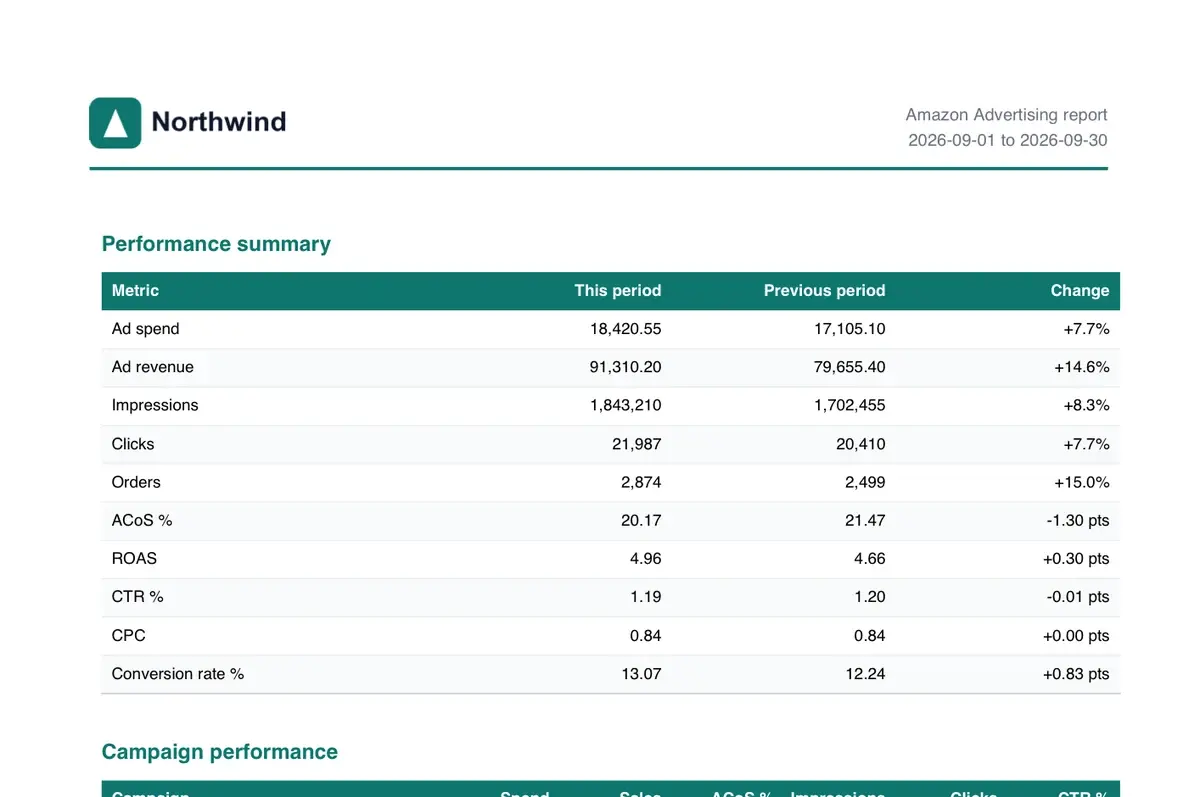
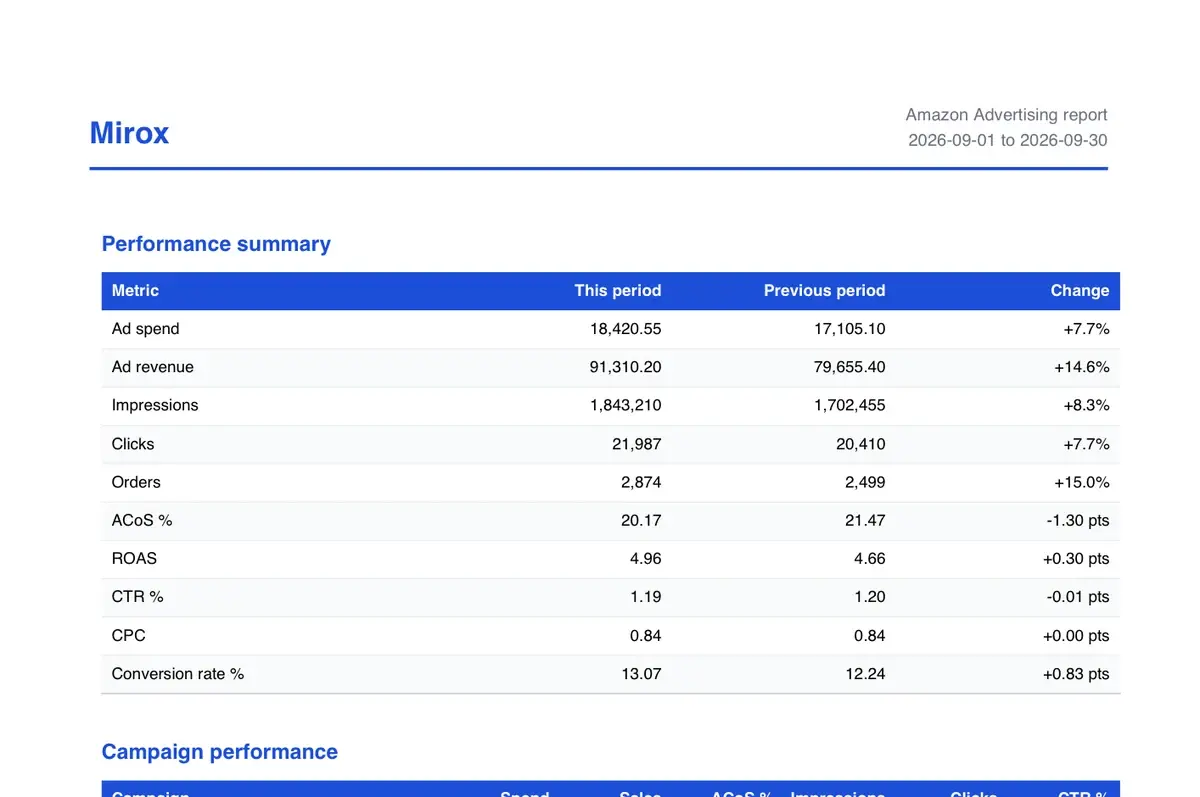
Carries your brand
- Your client's own login: your logo or name, your colour, your name in the browser tab. Read-only.
- No Mirox prices, plans or upgrade buttons anywhere in your client's login.
- Client reports (PDF and CSV): your logo, colour, name and footer line. On Growth and Scale.
- The invite your client receives: your logo and colour, and replies go to your address.
Still says Mirox
- Amazon's permission screen, when your client connects their account. Amazon names the app, and no setting can change that.
- The terms and privacy policy your client accepts, because Mirox processes their Amazon data.
- The email sender address (noreply@mirox.pt). The invite also says that your agency runs their ads with Mirox.
- The web address: client logins are on app.mirox.pt. Your own domain is not available yet.
What your client sees, and what your team sees
Your client gets a read-only view under your brand. Your team works in the full product.
| Your client | Your team | |
|---|---|---|
| Branding | Your logo or name, your colour, your name in the browser tab. | Mirox, so your team knows which tool they are in. |
| Access | Read-only. They see everything in their own account and can change nothing. | Full control, by role: owner, manager, analyst or viewer. |
| Prices and plans | None. No plans, prices or upgrade buttons. | Your agency plan, your seats and one invoice. |
| Decisions | Every bid change with the reason behind it, for their own account. | Every client, one workspace each. Switch between them without logging out. |
| Reports | PDF and CSV reports with your logo and colour, sent by you. | Pick the period and the sections, then export. Growth and Scale. |
Setting it up
01
Add your brand
In Settings, under Branding: your logo, the name you trade under, your colour and a footer line for reports. If your colour is too light to read, Mirox uses a readable shade for text and tells you.
02
Set a reply-to address
Emails to your client still send from Mirox so they reach the inbox. When your client replies, it goes to the address you set.
03
Give the client a login
Per client, when you choose. Your client gets an invite with your logo, sets a password and lands in a read-only view of their own account.
04
Send the first report
Choose the period and the sections, export as PDF or CSV, and send it under your name. The sample above is what your client receives.
White label is included
The branded client login is in every agency tier. White-label reports come with Growth and Scale. On Growth, 20 clients cost €121.50 per client a month on average. Billed for at least 5 clients.
See agency pricingWhite label questions
Can the client login run on our own domain?
Not yet. Client logins are on app.mirox.pt. A custom domain, such as ads.youragency.com, is not available today.
Will my client ever see Mirox?
In three places: Amazon's permission screen when they connect their account, the terms they accept, and the email sender address. Their login and their reports carry your brand, and they never see Mirox prices or plans.
Do emails to my client come from our domain?
No. They send from Mirox's address (noreply@mirox.pt) so they reach the inbox. The invite your client receives carries your logo and colour, and replies go to your reply-to address. Other account emails, such as a password reset, carry the Mirox name.
Which tiers include white label?
The branded client login is in every agency tier. White-label PDF and CSV reports need Growth or Scale.
Who owns the client's data?
Your client. The client is the controller of their data, your agency is the processor, and Mirox is your sub-processor, under our Data Processing Agreement.
What happens if our agency stops using Mirox?
Your clients' history is not deleted when you leave. Before you go, you can export each client's full decision history as CSV files. Offboarding a client removes Amazon access and stops bidding; deleting the data is the client's own decision.
Can I send my client a link to one decision?
Not as a public link. Your client can read every decision in their own login, and you can export the decisions for any period as a CSV file.
Ask about white label
Tell us about your agency and what your clients need to see. If you would rather talk it through, book half an hour.